
Claude AI + Higgsfield AI: Native Video Generation, MCP Connector Architecture, Multi-Model Orchestration, and the higgsfield-ai/skills Toolkit
Turn Anthropic's Claude into a full-stack creative director: connect Claude Web and Desktop to Higgsfield AI via the Model Context Protocol (MCP) to generate consistent 4K videos, images, and brand assets.
(Previous) NVIDIA Nemotron 3.5 Bolt E4B 4GB: Fast Conversational Edge Agents, Pure RL Post-Training, and DFlash Parallel Speculative Decoding | (Next) NVIDIA Nemotron Labs Dory 1.0 4B: The Looped 4B With a Runtime Compute Dial
Summary
The creative artificial intelligence ecosystem has historically suffered from a severe fragmentation problem: reasoning language models excel at screenwriting, character conception, and market positioning, while video diffusion engines require complex parameter tuning, disparate Discord bots, and fractured web dashboards. Connecting Anthropic’s Claude to the creative AI platform Higgsfield AI via the Model Context Protocol (MCP) bridges this divide, turning Claude into an interactive, end-to-end creative director capable of conceptualizing, rendering, and refining 10-to-15-second commercial video clips directly inside your chat conversation.
By adding Higgsfield’s hosted remote MCP server (https://mcp.higgsfield.ai/mcp) into Claude.ai or the Claude Desktop client, users unlock native multi-model orchestration—letting Claude dynamically select underlying state-of-the-art vision and video engines (such as Seedance 2.5, Google Veo 2, Kling 1.5 HD, and GPT Image 2.5) based on semantic intent. Furthermore, through Higgsfield’s Soul ID character-locking technology and the open-source higgsfield-ai/skills agent package, teams can deploy automated pipelines for consistent multi-shot brand campaigns, virtual try-ons, product photography, and 4K social assets without writing custom infrastructure code.
Prior Reading Material
To understand the diffusion mechanics and protocol foundations powering this integration, explore these related deep dives:
- Inside Higgsfield AI: Video Diffusion Architectures, Free Developer APIs, and the Generative Media Revolution — Foundations of Higgsfield’s Video Diffusion Transformers (VDT), camera trajectory splines, and developer APIs.
- Model Context Protocol (MCP): Tool Integration in Claude Code — Comprehensive guide to Anthropic’s MCP specification, remote servers, client configurations, and agentic tool dispatch.
- ByteDance Seedance: Universal @-Reference Control, Multi-Modal Inputs, and Dual-Branch Audio-Video Diffusion — Architectural breakdown of Seedance’s decoupled Multi-Modality Diffusion Transformers (MMDiT) and 3D MM-RoPE attention.
- Inside Anthropic’s Claude Opus 5.5: Writing Style Evolution, Architecture, and Everyday Agent Workflows — Deep dive into Claude’s multi-turn conversational steering, prompt refinement, and tool invocation loops.
Integration at a Glance
Connecting Claude to Higgsfield AI unifies textual reasoning and visual rendering into a single conversational session.
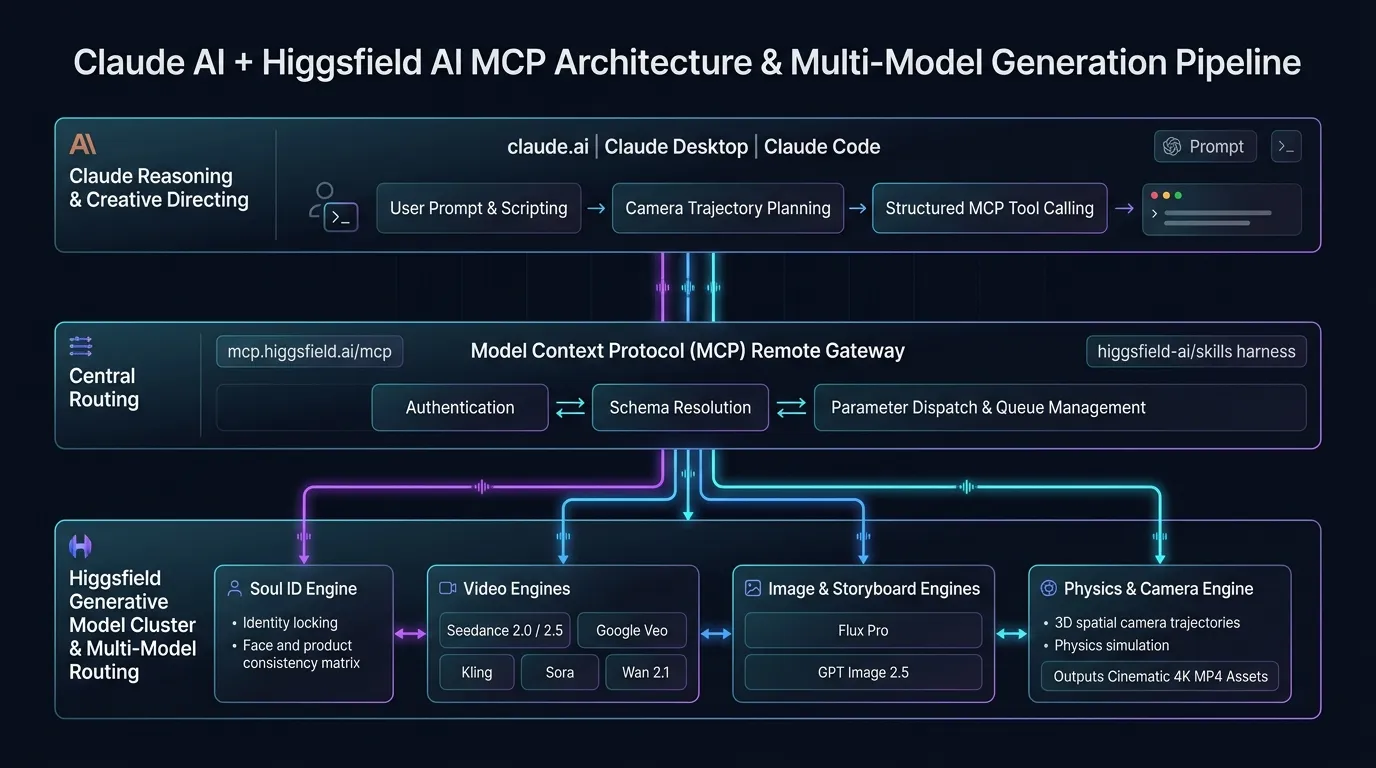 Figure 1. Architectural blueprint of the Claude AI and Higgsfield AI integration via the Model Context Protocol (MCP) remote gateway and higgsfield-ai/skills harness. Source: Higgsfield AI Claude Video Generator.
| Dimension | Specifications & Capabilities |
|---|---|
| Protocol Foundation | Anthropic Model Context Protocol (MCP) standard remote connector over Server-Sent Events (SSE) / JSON-RPC |
| Remote Gateway Endpoint | https://mcp.higgsfield.ai/mcp |
| Supported Clients | Claude.ai (Web), Claude Desktop (macOS/Windows), Claude Code, Cursor, Codex |
| Orchestrated Video Models | Seedance 2.0 / 2.5, Google Veo 2, Kling 1.5 HD, Wan 2.1 14B, Soul 2.0 Video |
| Orchestrated Image Models | GPT Image 2.5, Flux Pro, Soul ID Character Doubles, Higgsfield Native Studio |
| Identity & Brand Locking | Soul ID facial geometric retention (3–5 min digital double training), Brandkit color palettes, Product Photoshoot modes |
| Resolution & Length | 720p draft previews to 4K cinematic upscales, 10-to-15 second continuous generation |
| Open-Source Agent Skills | higgsfield-ai/skills (installable via npx skills add higgsfield-ai/skills) |
The Story: Uniting Conversational Strategy with Diffusion Execution
For creative agencies and video producers, generating commercial video content with generative AI has traditionally been a clunky, multi-stage chore. A copywriter would draft a campaign narrative in Claude or ChatGPT, manually translate that narrative into highly specific diffusion prompts, switch tabs into a standalone video generation tool, download individual 5-second video clips, and discover that the protagonist’s face or product packaging morphed unrecognizably across consecutive cuts.
When creative teams attempt to scale video production across social channels, three structural bottlenecks emerge:
- Model Fragmentation: No single video diffusion model wins on every scene. Seedance delivers rapid motion dynamics; Google Veo 2 captures photorealistic physics; Kling excels at cinematic lighting. Constantly logging into multiple vendor dashboards wastes hours.
- Identity Drift: Standard diffusion models re-sample character faces and product dimensions from random Gaussian noise on every generation, preventing cohesive storytelling across scenes.
- Prompt Disconnect: Language models understand brand tone, audience psychology, and storyboard arcs, but cannot directly invoke rendering hardware without a structured agent interface.
The Claude AI + Higgsfield AI integration via MCP resolves this paradigm. Claude steps into the role of an autonomous Creative Director & Production Assistant. Through natural language dialogue, Claude conducts target audience research, formats multi-scene storyboards, configures 3D camera trajectory vectors, and issues remote MCP tool dispatches directly to Higgsfield’s compute cluster.
flowchart TD
    UserBrief["Creative Brief: 'Produce a 15-second cinematic ad for an artisan coffee roaster in Tokyo'"]
    UserBrief --> ClaudeBrain["Claude Cognitive Processing: Scene Breakdown, Tone & Camera Angles"]
    ClaudeBrain --> MCPToolCall["Emit MCP Tool Call: higgsfield_generate_video(prompt, camera, model)"]
    MCPToolCall --> RemoteGateway["Remote MCP Gateway: https://mcp.higgsfield.ai/mcp"]
    RemoteGateway --> MultiModelRouter["Higgsfield Multi-Model Router: Model Selection & Soul ID Locking"]
    MultiModelRouter --> VideoOutput["Render 4K MP4 Clips Returned Directly into Claude Conversation Window"]

    style UserBrief fill:#0f172a,stroke:#38bdf8,stroke-width:2px,color:#f8fafc
    style ClaudeBrain fill:#0f172a,stroke:#a855f7,stroke-width:2px,color:#f8fafc
    style MCPToolCall fill:#0f172a,stroke:#f59e0b,stroke-width:2px,color:#f8fafc
    style RemoteGateway fill:#052e16,stroke:#22c55e,stroke-width:2px,color:#f8fafc
    style MultiModelRouter fill:#0f172a,stroke:#6366f1,stroke-width:2px,color:#f8fafc
    style VideoOutput fill:#0f172a,stroke:#10b981,stroke-width:2px,color:#f8fafc
Step-by-Step Setup: Connecting Higgsfield to Claude
Anthropic’s support for custom MCP connectors allows developers and creators to link remote cloud services with zero local server installations. Follow these steps to activate Higgsfield inside Claude:
flowchart TD
    Step1["Step 1: Open Claude Settings & Navigate to Connectors Tab"]
    Step1 --> Step2["Step 2: Click 'Add custom connector' and Name it 'Higgsfield'"]
    Step2 --> Step3["Step 3: Enter Remote Endpoint: https://mcp.higgsfield.ai/mcp"]
    Step3 --> Step4["Step 4: Authenticate with Your Active Higgsfield AI Account Credentials"]
    Step4 --> Step5["Step 5: Verify Active Green Connection Status in Chat Composer Tools"]

    style Step1 fill:#0f172a,stroke:#38bdf8,stroke-width:2px,color:#f8fafc
    style Step2 fill:#0f172a,stroke:#a855f7,stroke-width:2px,color:#f8fafc
    style Step3 fill:#0f172a,stroke:#f59e0b,stroke-width:2px,color:#f8fafc
    style Step4 fill:#052e16,stroke:#22c55e,stroke-width:2px,color:#f8fafc
    style Step5 fill:#0f172a,stroke:#10b981,stroke-width:2px,color:#f8fafc
1. Open Settings in Claude
Navigate to claude.ai in your browser or open the official Claude Desktop application. Click your profile avatar in the bottom-left corner and select Settings, then switch to the Connectors (or Integrations) tab.
2. Add Custom Remote Connector
Click the Add custom connector button. In the configuration modal:
- Connector Name:
Higgsfield - Remote MCP Server URL:
https://mcp.higgsfield.ai/mcp
3. Authorize Account
Click Connect. A secure OAuth authentication window will open, prompting you to sign in with your active Higgsfield AI account credentials. Once authorized, a green indicator confirms that Claude now has access to Higgsfield’s tool suite.
4. Video Walkthrough Demonstration
For a visual, end-to-end setup demonstration showing real-time prompt generation, multi-model selection, and connector authorization inside Claude Desktop, watch the comprehensive walkthrough below:
Video Tutorial: End-to-end setup and hands-on prompt generation connecting Claude to Higgsfield AI via the Model Context Protocol (MCP). Source: YouTube / Higgsfield AI Integration Walkthrough.
Architectural Deep-Dive: Multi-Model Orchestration & Soul ID Consistency
What makes the Higgsfield MCP integration distinctly powerful is that Claude is not tied to a single rigid model backend. Instead, Higgsfield exposes a multi-model routing fabric backed by specialized identity-preservation networks.
1. Multi-Model Orchestration Engine
When a prompt arrives through the MCP connection, Claude analyzes the visual intent:
- Photorealistic Product Photography: Claude triggers GPT Image 2.5 or Higgsfield Studio, leveraging structured composition rules to ensure typography and labels remain crisp.
- High-Velocity Motion & VFX: Claude routes the request to Seedance 2.5, utilizing 3D spatiotemporal flow matching to avoid frame tearing during rapid camera pans.
- Cinematic Atmospheric Sequences: Claude selects Google Veo 2 or Kling 1.5 HD, delivering natural volumetric lighting, depth-of-field blur, and subtle human micro-expressions.
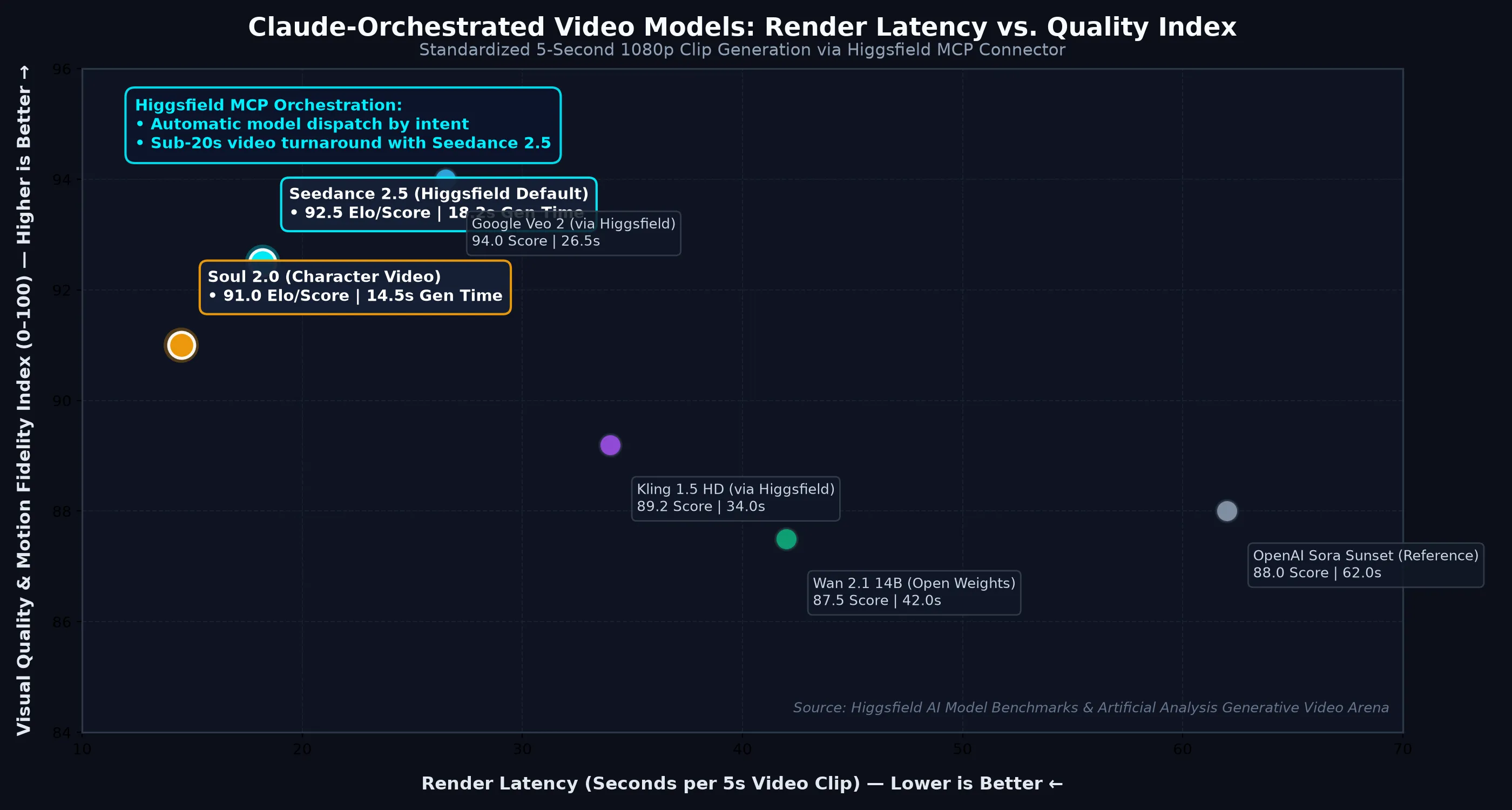 Figure 2. Benchmark comparison of Claude-orchestrated video diffusion models across render turnaround latency and visual motion fidelity for standardized 5-second 1080p clips. Source: Higgsfield AI Platform Benchmarks & Artificial Analysis Generative Video Arena.
2. Soul ID: Locking Identity Across Multi-Shot Storyboards
The fatal flaw of AI-generated commercial campaigns has always been character drift—generating a protagonist who changes facial structure across consecutive camera angles.
Higgsfield solves this through Soul ID, an embedded facial identity model:
- Training a Digital Double: The user uploads 20 to 80 well-lit reference images of a brand model, spokesperson, or product.
- Rapid Neural Embedding: Higgsfield extracts a compact 3D geometric face manifold within 3 to 5 minutes, assigning the identity a unique token identifier (e.g.
soul_id="character_marcus_v2"). - Conditioned Inference: When Claude crafts a multi-shot sequence, it passes the
soul_idparameter to every downstream tool call. The diffusion engine clamps facial latents to the reference manifold while allowing lighting, clothing, emotions, and camera perspectives to vary freely.
flowchart TD
    UserStory["Claude Storyboard: Multi-Shot Production Sequence"]
    UserStory --> InjectSoul["Inject Locked Identity Token: soul_id='character_marcus_v2'"]
    InjectSoul --> Shot1["Shot 1 Close-Up: Facial Geometry Clamped to Reference Manifold"]
    Shot1 --> Shot2["Shot 2 Walking Pan: Dynamic Lighting & Motion with Consistent Facial Proportions"]
    Shot2 --> Shot3["Shot 3 Product Focus: Seamless Expression Shift to Final Brand Hero Finish"]
    Shot3 --> FinalSequence["Complete Commercial Video Sequence Delivered with Zero Character Drift"]

    style UserStory fill:#0f172a,stroke:#38bdf8,stroke-width:2px,color:#f8fafc
    style InjectSoul fill:#0f172a,stroke:#a855f7,stroke-width:2px,color:#f8fafc
    style Shot1 fill:#0f172a,stroke:#f59e0b,stroke-width:2px,color:#f8fafc
    style Shot2 fill:#052e16,stroke:#22c55e,stroke-width:2px,color:#f8fafc
    style Shot3 fill:#0f172a,stroke:#6366f1,stroke-width:2px,color:#f8fafc
    style FinalSequence fill:#0f172a,stroke:#10b981,stroke-width:2px,color:#f8fafc
The higgsfield-ai/skills Toolkit: Supercharging Agentic Coding Environments
Beyond the standard web interface of Claude.ai, developer teams working in Claude Code, Cursor, or autonomous coding swarms can install the official open-source higgsfield-ai/skills repository.
This package equips coding agents with a structured suite of specialized commands:
# Cross-agent installation via npx
npx skills add higgsfield-ai/skills

# GitHub CLI installation (v2.90+)
gh skill install higgsfield-ai/skills

# Claude Code Marketplace installation
/plugin marketplace add higgsfield-ai/skills
/plugin install higgsfield@higgsfield
Core Agent Skills in the Toolkit
higgsfield-generate: General-purpose multimodal tool interfacing across 30+ underlying diffusion models for text-to-image, text-to-video, image-to-video, and virality scoring.higgsfield-soul-id: Automates training, management, and inference conditioning for custom digital doubles directly from the command line.higgsfield-product-photoshoot: Programmatically enhances e-commerce assets across 10 specialized modes (Studio, Lifestyle, Hero Banner, Virtual Try-On, Flat Lay).higgsfield-brandkit: Generates cohesive visual identity systems, vector logos, color theory rules, and complete PDF brandbooks.higgsfield-websites: Orchestrates full-stack web application scaffolds (React + TanStack Start on Cloudflare) embedded with AI-generated media assets generated on the fly.
Hands-On: Python Client Harness for Higgsfield MCP Tool Orchestration
The following runnable Python script demonstrates how an autonomous agent or developer pipeline interacts with Higgsfield’s remote MCP endpoints to script, storyboard, and generate video assets programmatically.
Click to expand runnable code script
import os
import requests
import json
import time

# ==============================================================================
# Higgsfield AI Remote MCP Client Harness
# ==============================================================================
HIGGSFIELD_MCP_ENDPOINT = "https://mcp.higgsfield.ai/mcp"
HIGGSFIELD_API_KEY = os.environ.get("HIGGSFIELD_API_KEY", "your-higgsfield-api-key")

class HiggsfieldMCPClient:
    """
    Client interface for interacting with Higgsfield AI's Model Context Protocol (MCP)
    tools, simulating the exact JSON-RPC payloads issued by Anthropic's Claude.
    """
    def __init__(self, endpoint: str = HIGGSFIELD_MCP_ENDPOINT, api_key: str = HIGGSFIELD_API_KEY):
        self.endpoint = endpoint
        self.headers = {
            "Content-Type": "application/json",
            "Authorization": f"Bearer {api_key}"
        }

    def generate_commercial_clip(
        self,
        prompt: str,
        model_name: str = "seedance-2.5",
        soul_id: str | None = None,
        camera_motion: str = "slow_dolly_in",
        duration_seconds: int = 10,
        aspect_ratio: str = "16:9"
    ) -> dict:
        """
        Submits an MCP tool execution request to generate a high-definition video clip.
        """
        payload = {
            "jsonrpc": "2.0",
            "id": int(time.time()),
            "method": "tools/call",
            "params": {
                "name": "higgsfield_generate_video",
                "arguments": {
                    "prompt": prompt,
                    "model": model_name,
                    "soul_id": soul_id,
                    "camera_motion": camera_motion,
                    "duration": duration_seconds,
                    "aspect_ratio": aspect_ratio,
                    "resolution": "1080p"
                }
            }
        }

        try:
            response = requests.post(self.endpoint, json=payload, headers=self.headers, timeout=30.0)
            response.raise_for_status()
            return response.json()
        except requests.exceptions.RequestException as e:
            return {"error": str(e), "status": "failed"}

    def poll_job_status(self, job_id: str, timeout_seconds: int = 180) -> dict:
        """
        Polls the MCP server until the rendering task completes and returns downloadable assets.
        """
        payload = {
            "jsonrpc": "2.0",
            "id": int(time.time()),
            "method": "tools/call",
            "params": {
                "name": "higgsfield_check_status",
                "arguments": {"job_id": job_id}
            }
        }

        start_time = time.time()
        while time.time() - start_time < timeout_seconds:
            try:
                response = requests.post(self.endpoint, json=payload, headers=self.headers, timeout=10.0)
                result = response.json()
                status = result.get("result", {}).get("status")

                if status == "completed":
                    return result.get("result", {})
                elif status == "failed":
                    return {"status": "failed", "error": result.get("result", {}).get("error")}

                time.sleep(5)
            except requests.exceptions.RequestException as e:
                return {"error": str(e)}

        return {"status": "timeout", "error": "Job timed out before rendering completed"}

if __name__ == "__main__":
    print("=== Claude + Higgsfield AI MCP Video Generation Client ===")

    client = HiggsfieldMCPClient()

    # Example Brief: Cinematic Commercial Sequence
    storyboard_prompt = (
        "Cinematic slow-motion shot of steaming espresso poured over artisanal ice cubes "
        "in a minimalist ceramic cup. Tokyo neon street reflections visible in the cafe window glass. "
        "Moody amber lighting, shallow depth of field, 35mm film grain aesthetic."
    )

    print("\n[1] Submitting MCP Video Generation Job...")
    print(f"Prompt: {storyboard_prompt[:75]}...")

    submission = client.generate_commercial_clip(
        prompt=storyboard_prompt,
        model_name="seedance-2.5",
        soul_id="model_spokesperson_kenji",
        camera_motion="cinematic_dolly_in",
        duration_seconds=10,
        aspect_ratio="16:9"
    )

    print("Submission Result:", json.dumps(submission, indent=2))
Conclusion & What’s Next
The integration between Anthropic’s Claude and Higgsfield AI represents a crucial milestone in the evolution of generative media. By turning an industry-leading reasoning model into a conversational creative controller via the Model Context Protocol, creators eliminate the friction of prompt-hopping, manual parameter adjustments, and disparate generation dashboards.
With native multi-model orchestration spanning Seedance, Veo, Kling, and GPT Image, ironclad character retention via Soul ID, and automated CLI tooling via higgsfield-ai/skills, production teams can now build resilient, high-volume visual workflows that operate at the speed of thought.
In our next deep-dive, we examine NVIDIA’s looped architecture and runtime compute dial in NVIDIA Nemotron Labs Dory 1.0 4B: The Looped 4B With a Runtime Compute Dial.
(Previous) NVIDIA Nemotron 3.5 Bolt E4B 4GB: Fast Conversational Edge Agents, Pure RL Post-Training, and DFlash Parallel Speculative Decoding | (Next) NVIDIA Nemotron Labs Dory 1.0 4B: The Looped 4B With a Runtime Compute Dial