
Part 3: Unlocking NVIDIA Omniverse: Architecture, OpenUSD, RTX Rendering, and the Industrial Metaverse Ecosystem
A comprehensive architectural deep-dive into NVIDIA Omniverse: OpenUSD scene graphs, Nucleus live-sync collaboration, RTX real-time ray tracing, and industrial digital twin ecosystems.
Series: ← Part 2: Inside NVIDIA Cosmos: World Foundation Models for Physical Commonsense & Video Trajectories (Previous)
Prior Reading Material
Before exploring NVIDIA Omniverse’s platform architecture, review these prerequisite posts across our series:
- Part 1: Unpacking the NVIDIA Physical AI Data Factory (PAIDF) Stack — Overview of NVIDIA’s 3-Computer Architecture, Digital Twin Flywheel, and Sim-to-Real data generation.
- Part 2: Inside NVIDIA Cosmos: World Foundation Models for Physical Commonsense & Video Trajectories — Mixture-of-Transformers (MoT), continuous latent tokenizers, and physics-conditioned trajectory generation.
- The Architectural Spectrum of World Foundation Models: Renderers, State Simulators, and Action Planners — World model taxonomies, spatial state graphs, and predictive physical simulation.
1. Introduction: The 3D Data Interoperability Crisis
In modern industrial engineering, architecture, and physical AI, digital assets do not live in a single unified format. A factory assembly line might have its mechanical robot arms designed in Autodesk Inventor or Siemens NX, its conveyor layouts drafted in CATIA, its factory architectural floor plan modeled in Revit, and its dynamic robotic behaviors scripted in ROS 2 or Blender.
Historically, aggregating these multi-software assets into a synchronized simulation required exporting files into lossy intermediate formats (such as .obj, .fbx, or .stl). Whenever an engineer adjusted a screw on a robotic gripper in CAD, the entire assembly line had to be manually re-exported, re-textured, and re-imported—breaking physics parameters, material definitions, and animation hierarchies.
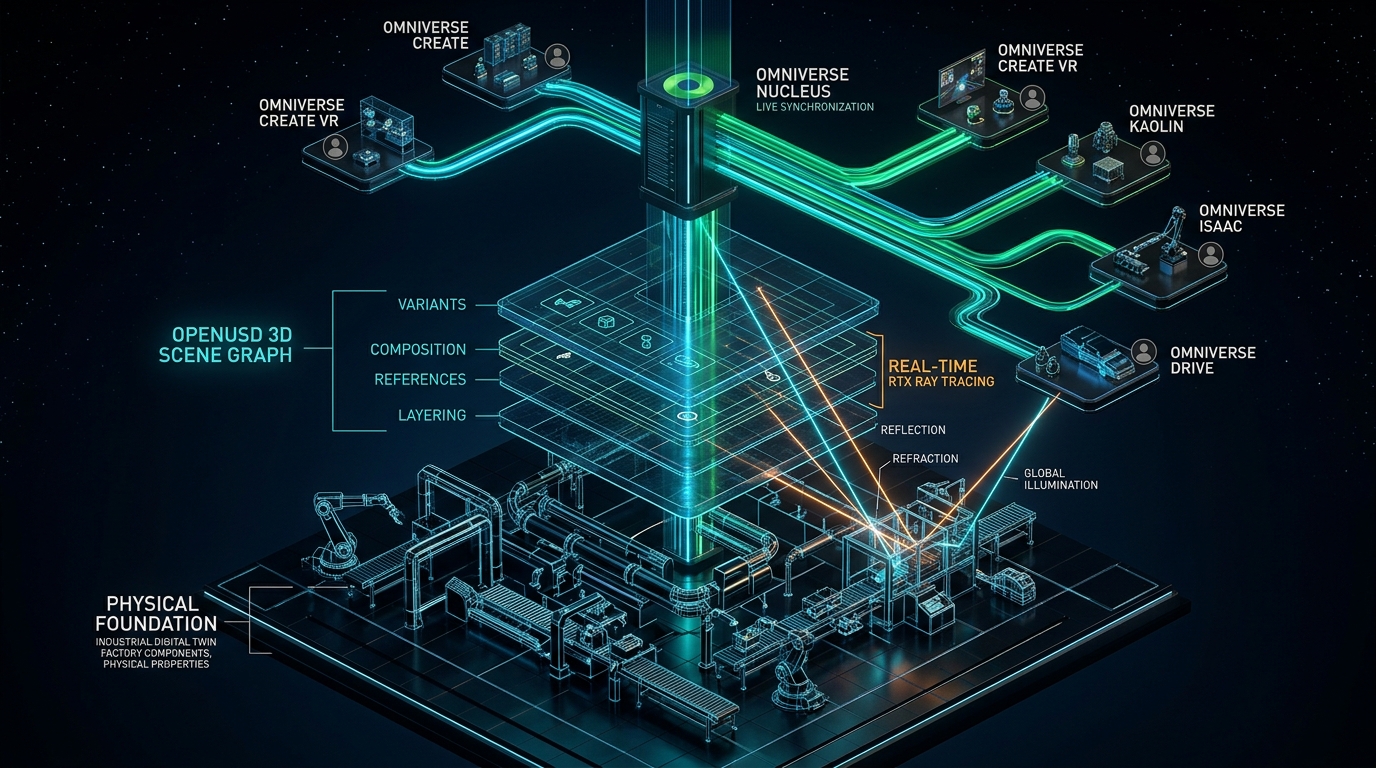
To eliminate this data silo, NVIDIA built NVIDIA Omniverse: an extensible computing platform designed for building custom 3D workflows, physics simulations, and industrial digital twins. Rather than attempting to replace third-party DCC (Digital Content Creation) and CAD tools, Omniverse serves as the universal real-time synchronization hub connecting diverse toolchains into a shared physical virtual world.
Official Platform Summary & Ecosystem Links
| Platform Component | Technical Role & Official Developer Link |
|---|---|
| Core Platform Hub | NVIDIA Omniverse Developer Portal |
| Omniverse Libraries | Modular Open-Source & Accelerated Libraries (ovrtx, ovstage, ovphysics) |
| AI Agent Skills | NVIDIA-Verified Agent Skills (CAD-to-SimReady, Scene Optimization, Neural Reconstruction) |
| Experimental Blueprints | NVIDIA Omniverse Labs (Reference patterns & physical AI samples) |
| Data Standard | OpenUSD (Universal Scene Description) & Alliance for OpenUSD (AOUSD) |
| Collaboration Engine | Omniverse Nucleus Live Synchronization |
| Graphics Engine | Omniverse RTX Real-Time Ray & Path Tracing Renderer |
| Ecosystem Connectors | Omniverse Connectors (Siemens, Autodesk, Blender, Unreal Engine) |
| Developer Framework | Omniverse Kit SDK & Python Extensions |
| Industrial Digital Twins | NVIDIA Omniverse for Industrial Manufacturing |
2. Intuitive Mental Model: The HTML of 3D & Google Docs for Physical Worlds
To understand why Omniverse is architected the way it is, consider two everyday digital metaphors:
1. OpenUSD as the “HTML of 3D”
When you open a web page in a browser, the browser parses an HTML document that references stylesheets (.css), images (.webp), scripts (.js), and embedded components from across the internet without copying them into one gigantic file.
OpenUSD (Universal Scene Description), originally developed by Pixar and standardized by NVIDIA, Apple, Adobe, Autodesk, and Pixar under the Alliance for OpenUSD (AOUSD), functions as the HTML of the 3D physical world. An OpenUSD file doesn’t just store static mesh polygons; it defines a hierarchical Scene Graph with non-destructive layering, references, variants, physics properties (mass, friction, elasticity), and material definitions (MDL).
2. Omniverse Nucleus as “Google Docs Live-Sync”
Imagine working on a joint engineering document where every collaborator had to email static .docx attachments back and forth versus editing a shared Google Doc simultaneously where character edits stream live.
Omniverse Nucleus is the live-sync collaboration database for 3D worlds. When a CAD engineer in Germany modifies an engine bracket in Siemens NX, Nucleus transmits only the atomic delta change (the diff) across the network. A simulation engineer in California running a robotics test in Omniverse sees the physical bracket update immediately in real-time with zero file export delays.
flowchart TD
    A["Third-Party CAD & DCC Tools<br/>Siemens NX, Autodesk Revit, Blender, CATIA"] --> B["Omniverse Connectors<br/>Translates native CAD data into OpenUSD deltas"]
    B --> C["Omniverse Nucleus Database Engine<br/>Pub/Sub Live-Sync & Atomic Delta Propagation"]
    C --> D["OpenUSD Universal Scene Graph<br/>Non-destructive layering, variants, & physical schemas"]
    D --> E["Omniverse RTX Rendering Engine<br/>Hardware-accelerated Path Tracing & Sensor Synthesis"]
    D --> F["PhysX 5 Physics Engine<br/>Rigid body, soft body, & multi-body GPU dynamics"]
    E --> G["Industrial Digital Twin Execution<br/>BMW Factory, Siemens Automation, Foxconn Lines"]
    F --> G

    style A fill:#0d2b45,stroke:#00e5ff,stroke-width:2px,color:#ffffff
    style B fill:#0d2b45,stroke:#00e5ff,stroke-width:2px,color:#ffffff
    style C fill:#1e293b,stroke:#38bdf8,stroke-width:2px,color:#ffffff
    style D fill:#1e293b,stroke:#38bdf8,stroke-width:2px,color:#ffffff
    style E fill:#0f172a,stroke:#a855f7,stroke-width:2px,color:#ffffff
    style F fill:#0f172a,stroke:#a855f7,stroke-width:2px,color:#ffffff
    style G fill:#0f2b1d,stroke:#10b981,stroke-width:2px,color:#ffffff
3. Four Core Pillars of the Omniverse Architecture
The Omniverse technology stack is structured into four tightly integrated layers:
| Architectural Pillar | Core Technology | Primary Functionality |
|---|---|---|
| 1. Universal Interchange | OpenUSD & MDL | Composes complex 3D scenes via non-destructive layers (SubLayers, References, Payloads, Variants) and physically accurate Material Definition Language (MDL). |
| 2. Live Sync Collaboration | Omniverse Nucleus | A centralized publish/subscribe database managing real-time atomic delta updates across multi-user CAD and simulation sessions. |
| 3. Extensible Microservices | Omniverse Kit SDK | A modular C++/Python runtime framework for assembling standalone applications, headless simulation containers, and custom UI tools. |
| 4. Photorealistic Compute | RTX Path Tracing & PhysX 5 | Real-time ray tracing utilizing dedicated RT Cores for photorealistic sensor rendering alongside GPU-parallelized rigid and soft body physics simulation. |
4. Engineering Deep-Dive: OpenUSD Composition & RTX Ray Tracing
4.1 OpenUSD Composition Arcs & Layer Stacking (LIVRPS)
OpenUSD achieves non-destructive collaborative editing through formal composition rules evaluated in a strict precedence order known as LIVRPS:
- L - Local Opinions: Edits authored directly on the current active layer.
- I - Inherits: Classes and properties inherited from abstract prim definitions.
- V - VariantSets: Dynamic switchable states (e.g. toggling robotic gripper types or paint finishes).
- R - References: Assets linked from external
.usdfiles. - P - Payload: Lazily loaded heavy geometry or sub-assemblies.
- S - Specializes: Specialized class overrides with fallback behaviors.
flowchart TD
    L1["1. Local Opinions (Highest Precedence)"] --> L2["2. Inherits"]
    L2 --> L3["3. VariantSets"]
    L3 --> L4["4. References"]
    L4 --> L5["5. Payloads (Lazy Loaded)"]
    L5 --> L6["6. Specializes (Lowest Precedence)"]
    L6 --> EVAL["Resolved Scene Prim State"]

    style L1 fill:#0d2b45,stroke:#00e5ff,stroke-width:2px,color:#ffffff
    style L2 fill:#0d2b45,stroke:#00e5ff,stroke-width:2px,color:#ffffff
    style L3 fill:#1e293b,stroke:#38bdf8,stroke-width:2px,color:#ffffff
    style L4 fill:#1e293b,stroke:#38bdf8,stroke-width:2px,color:#ffffff
    style L5 fill:#0f172a,stroke:#a855f7,stroke-width:2px,color:#ffffff
    style L6 fill:#0f172a,stroke:#a855f7,stroke-width:2px,color:#ffffff
    style EVAL fill:#0f2b1d,stroke:#10b981,stroke-width:2px,color:#ffffff
4.2 Real-Time RTX Rendering: The Rendering Equation
To synthesize physically authentic optical sensor data for robots and autonomous systems, the Omniverse RTX renderer solves the Kajiya Rendering Equation in real-time using hardware BVH (Bounding Volume Hierarchy) traversal:
$$L_o(p, \omega_o) = L_e(p, \omega_o) + \int_{\Omega} f_r(p, \omega_i, \omega_o) L_i(p, \omega_i) (\omega_i \cdot n) , d\omega_i$$
Where:
- $L_o(p, \omega_o)$ is the total spectral radiance leaving surface point $p$ in direction $\omega_o$.
- $L_e(p, \omega_o)$ is the emitted spectral radiance (e.g. active light sources or heated objects).
- $f_r(p, \omega_i, \omega_o)$ is the Bidirectional Reflectance Distribution Function (BRDF) defined by NVIDIA MDL materials.
- $L_i(p, \omega_i)$ is the incoming radiance from direction $\omega_i$.
- $(\omega_i \cdot n)$ is the Lambertian cosine factor between the incoming ray and the surface normal $n$.
5. Interactive Python Simulation: OpenUSD Scene Graph & Live-Sync Nucleus Engine
The following standalone, zero-dependency Python script demonstrates:
- Constructing an in-memory OpenUSD Scene Graph with hierarchical prims, transforms, and physical mass attributes.
- Simulating Omniverse Nucleus atomic delta live-sync updates across collaborative engineering clients.
- Evaluating non-destructive property composition.
Click to expand runnable Python simulation script
#!/usr/bin/env python3
"""
NVIDIA Omniverse OpenUSD Scene Graph & Nucleus Live-Sync Simulation
Demonstrates:
1. Hierarchical OpenUSD Prim Scene Graph composition.
2. LIVRPS composition layering and property inheritance.
3. Omniverse Nucleus atomic delta pub/sub synchronization.
"""

import time
import json

class UsdPrim:
    """Represents an OpenUSD Primitive (Prim) in a Scene Graph."""
    def __init__(self, name, prim_type="Xform", parent=None):
        self.name = name
        self.prim_type = prim_type
        self.parent = parent
        self.children = {}
        self.attributes = {}
        if parent:
            parent.children[name] = self

    @property
    def path(self):
        """Returns the full OpenUSD scenegraph path."""
        if self.parent is None:
            return "/" + self.name if self.name else "/"
        return f"{self.parent.path.rstrip('/')}/{self.name}"

    def set_attribute(self, key, value):
        self.attributes[key] = value

    def get_attribute(self, key, default=None):
        return self.attributes.get(key, default)

class NucleusLiveSyncServer:
    """Simulates an Omniverse Nucleus Real-Time Delta Server."""
    def __init__(self):
        self.clients = []
        self.delta_log = []

    def register_client(self, client_name):
        self.clients.append(client_name)
        print(f"🔗 [Nucleus] Client '{client_name}' connected to live-sync session.")

    def broadcast_delta(self, sender, prim_path, attribute_name, new_val):
        """Propagates atomic delta diffs to all connected session clients."""
        delta = {
            "timestamp": time.time(),
            "sender": sender,
            "path": prim_path,
            "attr": attribute_name,
            "val": new_val
        }
        self.delta_log.append(delta)
        for client in self.clients:
            if client != sender:
                print(f"  ⚡ [Live-Sync -> {client}] Delta applied: {prim_path}.{attribute_name} = {new_val}")

def main():
    print("=" * 70)
    print("🌐 NVIDIA Omniverse OpenUSD Scene Graph & Nucleus Live-Sync Simulation")
    print("=" * 70)

    # 1. Build an OpenUSD Stage Hierarchy
    print("\n📂 1. Assembling OpenUSD Scene Graph Hierarchy (USD Stage):")
    stage_root = UsdPrim("Factory_World", "Stage")
    assembly_line = UsdPrim("Assembly_Line_01", "Xform", stage_root)
    robot_arm = UsdPrim("Kuka_KR16_Robot", "Robot", assembly_line)
    gripper = UsdPrim("Parallel_Gripper", "EndEffector", robot_arm)

    # Set Initial USD Attributes (Mass, Position, Materials)
    robot_arm.set_attribute("transform:translate", [10.0, 0.0, 0.0])
    robot_arm.set_attribute("physics:mass_kg", 250.0)
    gripper.set_attribute("gripper:aperture_mm", 45.0)
    gripper.set_attribute("material:mdl_type", "OmniPBR_Steel")

    prims = [stage_root, assembly_line, robot_arm, gripper]
    for p in prims:
        print(f"  📌 Prim: {p.path:<40} Type: {p.prim_type:<15} Attrs: {json.dumps(p.attributes)}")

    # 2. Simulate Omniverse Nucleus Live Multi-User Collaboration
    print("\n👥 2. Simulating Omniverse Nucleus Multi-User Live-Sync:")
    nucleus = NucleusLiveSyncServer()
    nucleus.register_client("Engineer_CAD_Germany")
    nucleus.register_client("Robotics_Sim_USA")
    nucleus.register_client("Floor_Manager_Japan")

    print("\n🛠️ Engineer in Germany updates Robot Position in Siemens NX (transmitting atomic delta):")
    robot_arm.set_attribute("transform:translate", [12.5, 1.2, 0.0])
    nucleus.broadcast_delta("Engineer_CAD_Germany", robot_arm.path, "transform:translate", [12.5, 1.2, 0.0])

    print("\n🤖 Simulation Engineer in USA updates Gripper Aperture in Isaac Sim:")
    gripper.set_attribute("gripper:aperture_mm", 80.0)
    nucleus.broadcast_delta("Robotics_Sim_USA", gripper.path, "gripper:aperture_mm", 80.0)

    print("\n📊 3. Final Evaluated Prim State on USD Stage:")
    print(f"  Robot Current Position: {robot_arm.get_attribute('transform:translate')}")
    print(f"  Gripper Current Aperture: {gripper.get_attribute('gripper:aperture_mm')} mm")
    print(f"  Total Deltas Logged in Nucleus: {len(nucleus.delta_log)}")

    print("\n✅ Omniverse OpenUSD & Nucleus simulation completed successfully.")
    print("=" * 70)

if __name__ == "__main__":
    main()
6. Omniverse Libraries, Agent Toolkit, and AI Agent Skills
In modern physical AI engineering, Omniverse has evolved beyond a monolithic desktop GUI into a suite of modular, agent-callable libraries and microservices integrated into the NVIDIA Agent Toolkit.
Rather than requiring developers to load full interactive viewports, software developers and autonomous AI coding agents can embed standalone C++ and Python libraries directly into their existing application runtimes:
1. Modular Omniverse Libraries
ovstage: A shared, headless runtime for querying, traversing, and mutating OpenUSD scene graph data with zero graphical overhead.ovrtx: An accelerated ray-tracing and optical sensor simulation library capable of rendering camera, LiDAR, and radar sensor frustums on demand.ovphysics: A GPU-vectorized PhysX 5 dynamics engine executing multi-body collision and rigid-body calculations headlessly inside automated CI/CD pipelines.
2. NVIDIA-Verified AI Agent Skills
Through the NVIDIA Skills Repository, autonomous AI agents can invoke verified physical AI skills to orchestrate complex 3D asset preparation and simulation workflows:
- CAD-to-SimReady Skill: AI agents inspect raw incoming CAD files (STEP, IGES, JT), repair surface normal defects, generate convex collision hulls, assign physical mass properties and friction materials, and output validated SimReady OpenUSD assets.
- Neural Scene Reconstruction Skill: Agents ingest sparse real-world sensor captures and reconstruct photorealistic, geometrically accurate 3D USD environments for autonomous vehicle and robotics training.
- Scene Optimization & Validation Skill: Automated agents inspect massive factory-scale USD stages, identify rendering performance bottlenecks (overly dense polygon meshes, uncompressed textures), and apply level-of-detail (LOD) hierarchies automatically.
flowchart TD
    A["Autonomous AI Agent / Developer Prompt"] --> B["NVIDIA Agent Toolkit & Skills Router"]
    B --> C1["CAD-to-SimReady Skill<br/>Converts CAD to physically calibrated OpenUSD"]
    B --> C2["Scene Optimization Skill<br/>Applies LODs & cleans mesh geometry"]
    B --> C3["Sensor Simulation Skill (ovrtx)<br/>Generates synthetic LiDAR & RGB streams"]
    C1 --> D["Headless ovstage USD Runtime"]
    C2 --> D
    C3 --> D
    D --> E["Simulation-Ready Physical Twin (SimReady USD)"]

    style A fill:#0d2b45,stroke:#00e5ff,stroke-width:2px,color:#ffffff
    style B fill:#0d2b45,stroke:#00e5ff,stroke-width:2px,color:#ffffff
    style C1 fill:#1e293b,stroke:#38bdf8,stroke-width:2px,color:#ffffff
    style C2 fill:#1e293b,stroke:#38bdf8,stroke-width:2px,color:#ffffff
    style C3 fill:#1e293b,stroke:#38bdf8,stroke-width:2px,color:#ffffff
    style D fill:#0f172a,stroke:#a855f7,stroke-width:2px,color:#ffffff
    style E fill:#0f2b1d,stroke:#10b981,stroke-width:2px,color:#ffffff
7. Real-World Industrial Metaverse Ecosystems
Omniverse powers factory-scale digital twins across leading global enterprises:
- BMW Group (Virtual Factory Operations): Real-time simulation of complete automotive assembly plants, allowing planners worldwide to collaborate in OpenUSD, optimize robot paths, and validate production tooling before pouring concrete.
- Siemens (Industrial Automation): Integrating Siemens Xcelerator CAD and PLM data directly into Omniverse to simulate factory-floor automation architectures and energy efficiency metrics.
- Foxconn (Robotic Electronics Manufacturing): Utilizing Omniverse to simulate robotic assembly cells and autonomous mobile robots (AMRs) in virtual electronics factories before physical deployment.
8. Summary & Architectural Takeaways
NVIDIA Omniverse serves as the foundational operating layer for the industrial metaverse and physical AI:
- OpenUSD Data Standardization: By leveraging OpenUSD as the universal 3D scene representation, Omniverse eliminates file conversion bottlenecks, enabling non-destructive layering across multi-software engineering pipelines.
- Nucleus Real-Time Synchronization: The Nucleus pub/sub delta engine enables synchronized multi-user collaboration across globally distributed teams with minimal network overhead.
- Agent-Callable Modular Libraries: With
ovstage,ovrtx, and AI Agent Skills (CAD-to-SimReady), Omniverse enables autonomous AI agents to automate 3D scene assembly and physical simulation pipelines programmatically. - Physically Accurate Compute: Combining hardware-accelerated RTX path tracing with GPU-parallelized PhysX 5 dynamics provides the exact physical ground-truth required for synthetic data generation.
In Part 4 of our series, we will build directly on Omniverse to explore NVIDIA Isaac Sim & Omniverse Replicator, detailing GPU physics dynamics, synthetic sensor pipelines, and automated domain randomization.